Beginner’s Guide: Buying Your First SBC
A complete guide for beginners who want to buy a Single Board Computer (SBC) and start automating their home or workplace with General Bots.
What is an SBC?
A Single Board Computer (SBC) is a complete computer on a single circuit board. Unlike a desktop PC, it’s:
- Small - Credit card to smartphone size
- Low power - 2-15 watts (vs 200W+ for a PC)
- Affordable - $15-150 depending on power
- Quiet - No fans on most models
- GPIO equipped - Can connect to sensors and actuators
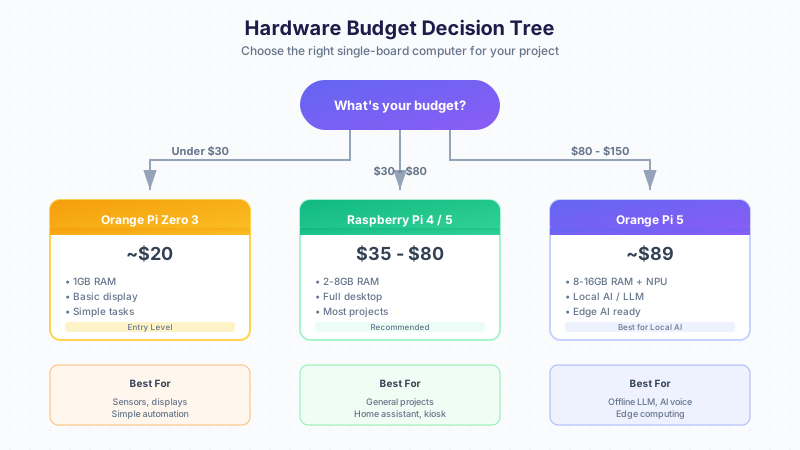
Which SBC Should I Buy?
Decision Flowchart
Recommended Starter Kits
🌟 Best for Beginners: Raspberry Pi 4 Kit (~$80)
What to buy:
- Raspberry Pi 4 Model B (4GB RAM) - $55
- Official power supply (USB-C 5V 3A) - $8
- 32GB microSD card (Class 10) - $8
- Case with heatsink - $10
Where to buy:
- The Pi Hut (UK)
- Adafruit (US)
- Amazon (Worldwide)
- AliExpress (Budget option, slower shipping)
💰 Budget Option: Orange Pi Zero 3 Kit (~$35)
What to buy:
- Orange Pi Zero 3 (1GB RAM) - $20
- 5V 2A power supply - $5
- 16GB microSD card - $5
- Acrylic case - $5
🧠 Best for AI: Orange Pi 5 Kit (~$120)
What to buy:
- Orange Pi 5 (8GB RAM) - $89
- 12V 2A power supply - $10
- 64GB microSD or NVMe SSD - $15
- Cooling fan case - $10
This board has a 6 TOPS NPU for accelerated AI inference!
What Else Do I Need?
Essential Accessories
| Item | Purpose | Price Range |
|---|---|---|
| microSD Card | Operating system storage | $8-15 |
| Power Supply | Power the board | $8-15 |
| Ethernet Cable | Wired network (faster) | $5 |
| HDMI Cable | Connect to monitor/TV | $5-10 |
| USB Keyboard | Initial setup | $10-20 |
For Display Projects
| Item | Purpose | Price Range |
|---|---|---|
| 3.5“ TFT LCD | Small color touchscreen | $15-25 |
| 7“ HDMI LCD | Larger display | $40-60 |
| 16x2 LCD | Simple text display | $5-10 |
| 0.96“ OLED | Tiny status display | $5-8 |
For Home Automation
| Item | Purpose | Price Range |
|---|---|---|
| Relay Module (4ch) | Control lights, appliances | $5-10 |
| DHT22 Sensor | Temperature & humidity | $5-8 |
| PIR Sensor | Motion detection | $3-5 |
| Buzzer | Alerts and notifications | $2-3 |
| Jumper Wires | Connect components | $3-5 |
| Breadboard | Prototyping | $3-5 |
Sample Shopping Lists
Home Temperature Monitor ($45)
Perfect first project - monitor and log temperature!
| Item | Price |
|---|---|
| Orange Pi Zero 3 (1GB) | $20 |
| 16GB microSD card | $5 |
| 5V 2A power supply | $5 |
| DHT22 temperature sensor | $6 |
| 0.96“ OLED display (I2C) | $6 |
| Jumper wires (female-female) | $3 |
| Total | $45 |
Smart Doorbell ($70)
AI-powered doorbell with notifications!
| Item | Price |
|---|---|
| Raspberry Pi Zero 2 W | $15 |
| Pi Camera Module | $25 |
| Push button | $1 |
| Piezo buzzer | $2 |
| LED (with resistor) | $1 |
| 16GB microSD card | $5 |
| 5V 2.5A power supply | $8 |
| Case | $5 |
| Jumper wires | $3 |
| Total | $70 |
Offline AI Assistant ($150)
Run AI completely offline - no internet needed!
| Item | Price |
|---|---|
| Orange Pi 5 (8GB RAM) | $89 |
| 128GB NVMe SSD | $20 |
| 12V 3A power supply | $12 |
| 7“ HDMI touchscreen | $45 |
| USB microphone | $10 |
| Case with fan | $15 |
| Jumper wires | $3 |
| Total | ~$195 |
Voice-Controlled Lights ($55)
Control your lights by talking!
| Item | Price |
|---|---|
| Raspberry Pi 4 (2GB) | $35 |
| 4-channel relay module | $6 |
| USB microphone | $8 |
| 16GB microSD card | $5 |
| 5V 3A power supply | $8 |
| Jumper wires | $3 |
| Total | ~$65 |
Where to Buy (By Region)
United States
- Amazon - Fast shipping, good returns
- Adafruit - Quality accessories, great tutorials
- SparkFun - Sensors and components
- Micro Center - If you have one nearby!
Europe
- The Pi Hut (UK) - Official Pi reseller
- Pimoroni (UK) - Creative accessories
- Amazon.de/.fr/.es - Local shipping
- Conrad (Germany) - Electronics store
Asia
- AliExpress - Cheapest, 2-4 week shipping
- Taobao (China) - Even cheaper if you read Chinese
- Amazon.co.jp (Japan)
South America
- MercadoLivre (Brazil) - Local marketplace
- FilipeFlop (Brazil) - Arduino/Pi specialist
- Amazon.com.br - Limited selection
Tips for AliExpress
- Check seller ratings (97%+ is good)
- Read reviews with photos
- Expect 2-4 weeks shipping
- Buy from China Direct for best prices
- Consider “Choice” items for faster shipping
First-Time Setup Guide
Step 1: Flash the OS
- Download Raspberry Pi Imager
- Insert your microSD card
- Select:
- Device: Your board
- OS: Raspberry Pi OS Lite (64-bit)
- Storage: Your microSD
- Click EDIT SETTINGS:
- Set hostname:
mybot - Enable SSH
- Set username/password
- Configure WiFi
- Set hostname:
- Click WRITE
Step 2: First Boot
- Insert microSD into your SBC
- Connect power
- Wait 2 minutes for first boot
- Find your device:
# On your computer
ping mybot.local
# or check your router's device list
Step 3: Connect via SSH
ssh pi@mybot.local
# Enter your password
Step 4: Install General Bots
# Quick install
curl -fsSL https://get.generalbots.com | bash

# Or use the deploy script
git clone https://github.com/GeneralBots/botserver.git
cd botserver
./scripts/deploy-embedded.sh --local --with-ui
Step 5: Access the Interface
Open in your browser:
http://mybot.local:8088
Common Beginner Mistakes
❌ Wrong Power Supply
Problem: Board keeps rebooting or won’t start
Solution:
- Raspberry Pi 4/5: Use official 5V 3A USB-C PSU
- Orange Pi 5: Use 12V 2A, not 5V!
- Don’t use phone chargers - they can’t supply enough current
❌ Cheap/Slow microSD Card
Problem: Slow boot, random crashes, data corruption
Solution:
- Buy Class 10 or A1/A2 rated cards
- Good brands: SanDisk, Samsung, Kingston
- Avoid no-name cards from AliExpress
❌ No Heatsink/Cooling
Problem: Board throttles or overheats
Solution:
- Always use heatsinks on the CPU
- Consider a fan for Pi 4/5 or Orange Pi 5
- Use a case with ventilation
❌ Connecting to Wrong Voltage
Problem: Fried components, magic smoke
Solution:
- Raspberry Pi GPIO is 3.3V only!
- Never connect 5V to GPIO pins
- Use level shifters for 5V sensors
Getting Help
Community Resources
Recommended YouTube Channels
- ExplainingComputers - Great SBC reviews
- Jeff Geerling - Deep Pi tutorials
- Andreas Spiess - IoT and sensors
- DroneBot Workshop - Beginner friendly
Books
- “Getting Started with Raspberry Pi” - Matt Richardson
- “Make: Electronics” - Charles Platt
Next Steps
Once you have your SBC:
- Quick Start Guide - Get GB running in 5 minutes
- GPIO Keywords - Control hardware with BASIC
- Templates - Ready-made automation projects
- Local LLM - Add offline AI capabilities
Happy building! 🤖