Local LLM - Offline AI with llama.cpp
Run AI inference completely offline on embedded devices. No internet, no API costs, full privacy.
Overview
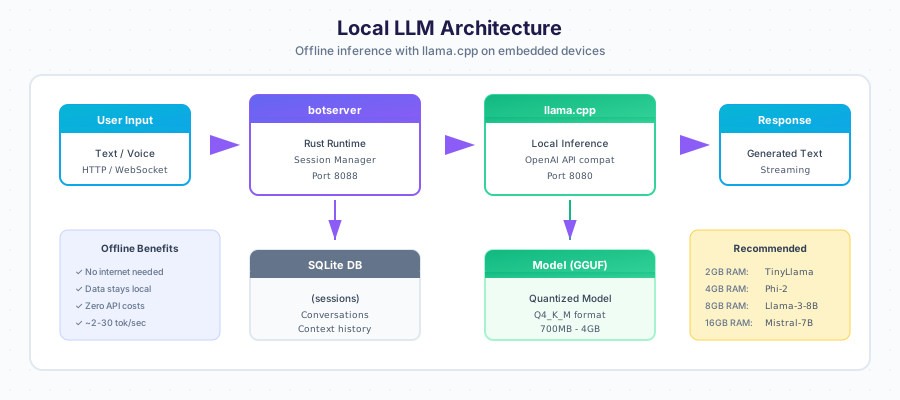
Recommended Models
By Device RAM
| RAM | Model | Size | Speed | Quality |
|---|---|---|---|---|
| 2GB | TinyLlama 1.1B Q4_K_M | 670MB | ~5 tok/s | Basic |
| 4GB | Phi-2 2.7B Q4_K_M | 1.6GB | ~3-4 tok/s | Good |
| 4GB | Gemma 2B Q4_K_M | 1.4GB | ~4 tok/s | Good |
| 8GB | Llama 3.2 3B Q4_K_M | 2GB | ~3 tok/s | Better |
| 8GB | Mistral 7B Q4_K_M | 4.1GB | ~2 tok/s | Great |
| 16GB | Llama 3.1 8B Q4_K_M | 4.7GB | ~2 tok/s | Excellent |
By Use Case
Simple Q&A, Commands:
TinyLlama 1.1B - Fast, basic understanding
Customer Service, FAQ:
Phi-2 or Gemma 2B - Good comprehension, reasonable speed
Complex Reasoning:
Llama 3.2 3B or Mistral 7B - Better accuracy, slower
Installation
Automatic (via deploy script)
./scripts/deploy-embedded.sh pi@device --with-llama
Manual Installation
# SSH to device
ssh pi@raspberrypi.local

# Install dependencies
sudo apt update
sudo apt install -y build-essential cmake git wget

# Clone llama.cpp
cd /opt
sudo git clone https://github.com/ggerganov/llama.cpp
sudo chown -R $(whoami):$(whoami) llama.cpp
cd llama.cpp

# Build for ARM (auto-optimizes)
mkdir build && cd build
cmake .. -DLLAMA_NATIVE=ON -DCMAKE_BUILD_TYPE=Release
make -j$(nproc)

# Download model
mkdir -p /opt/llama.cpp/models
cd /opt/llama.cpp/models
wget https://huggingface.co/TheBloke/TinyLlama-1.1B-Chat-v1.0-GGUF/resolve/main/tinyllama-1.1b-chat-v1.0.Q4_K_M.gguf
Start Server
# Test run
/opt/llama.cpp/build/bin/llama-server \
    -m /opt/llama.cpp/models/tinyllama-1.1b-chat-v1.0.Q4_K_M.gguf \
    --host 0.0.0.0 \
    --port 8080 \
    -c 2048 \
    --threads 4

# Verify
curl http://localhost:8080/v1/models
Systemd Service
Create /etc/systemd/system/llama-server.service:
[Unit]
Description=llama.cpp Server - Local LLM
After=network.target

[Service]
Type=simple
User=root
WorkingDirectory=/opt/llama.cpp
ExecStart=/opt/llama.cpp/build/bin/llama-server \
    -m /opt/llama.cpp/models/tinyllama-1.1b-chat-v1.0.Q4_K_M.gguf \
    --host 0.0.0.0 \
    --port 8080 \
    -c 2048 \
    -ngl 0 \
    --threads 4
Restart=always
RestartSec=5

[Install]
WantedBy=multi-user.target
Enable and start:
sudo systemctl daemon-reload
sudo systemctl enable llama-server
sudo systemctl start llama-server
Configuration
botserver .env
# Use local llama.cpp
LLM_PROVIDER=llamacpp
LLM_API_URL=http://127.0.0.1:8080
LLM_MODEL=tinyllama

# Memory limits
MAX_CONTEXT_TOKENS=2048
MAX_RESPONSE_TOKENS=512
STREAMING_ENABLED=true
llama.cpp Parameters
| Parameter | Default | Description |
|---|---|---|
-c | 2048 | Context size (tokens) |
--threads | 4 | CPU threads |
-ngl | 0 | GPU layers (0 for CPU only) |
--host | 127.0.0.1 | Bind address |
--port | 8080 | Server port |
-b | 512 | Batch size |
--mlock | off | Lock model in RAM |
Memory vs Context Size
Context 512:  ~400MB RAM, fast, limited conversation
Context 1024: ~600MB RAM, moderate
Context 2048: ~900MB RAM, good for most uses
Context 4096: ~1.5GB RAM, long conversations
Performance Optimization
CPU Optimization
# Check CPU features
cat /proc/cpuinfo | grep -E "(model name|Features)"

# Build with specific optimizations
cmake .. -DLLAMA_NATIVE=ON \
         -DCMAKE_BUILD_TYPE=Release \
         -DLLAMA_ARM_FMA=ON \
         -DLLAMA_ARM_DOTPROD=ON
Memory Optimization
# For 2GB RAM devices
# Use smaller context
-c 1024

# Use memory mapping (slower but less RAM)
--mmap

# Disable mlock (don't pin to RAM)
# (default is disabled)
Swap Configuration
For devices with limited RAM:
# Create 2GB swap
sudo fallocate -l 2G /swapfile
sudo chmod 600 /swapfile
sudo mkswap /swapfile
sudo swapon /swapfile

# Make permanent
echo '/swapfile none swap sw 0 0' | sudo tee -a /etc/fstab

# Optimize swap usage
echo 'vm.swappiness=10' | sudo tee -a /etc/sysctl.conf
NPU Acceleration (Orange Pi 5)
Orange Pi 5 has a 6 TOPS NPU that can accelerate inference:
Using rkllm (Rockchip NPU)
# Install rkllm runtime
git clone https://github.com/airockchip/rknn-llm
cd rknn-llm
./install.sh

# Convert model to RKNN format
python3 convert_model.py \
    --model tinyllama-1.1b-chat-v1.0.Q4_K_M.gguf \
    --output tinyllama.rkllm

# Run with NPU
rkllm-server \
    --model tinyllama.rkllm \
    --port 8080
Expected speedup: 3-5x faster than CPU only.
Model Download URLs
TinyLlama 1.1B (Recommended for 2GB)
wget https://huggingface.co/TheBloke/TinyLlama-1.1B-Chat-v1.0-GGUF/resolve/main/tinyllama-1.1b-chat-v1.0.Q4_K_M.gguf
Phi-2 2.7B (Recommended for 4GB)
wget https://huggingface.co/TheBloke/phi-2-GGUF/resolve/main/phi-2.Q4_K_M.gguf
Gemma 2B
wget https://huggingface.co/bartowski/gemma-2-2b-it-GGUF/resolve/main/gemma-2-2b-it-Q4_K_M.gguf
Llama 3.2 3B (Recommended for 8GB)
wget https://huggingface.co/bartowski/Llama-3.2-3B-Instruct-GGUF/resolve/main/Llama-3.2-3B-Instruct-Q4_K_M.gguf
Mistral 7B
wget https://huggingface.co/TheBloke/Mistral-7B-Instruct-v0.2-GGUF/resolve/main/mistral-7b-instruct-v0.2.Q4_K_M.gguf
API Usage
llama.cpp exposes an OpenAI-compatible API:
Chat Completion
curl http://localhost:8080/v1/chat/completions \
  -H "Content-Type: application/json" \
  -d '{
    "model": "tinyllama",
    "messages": [
      {"role": "user", "content": "What is 2+2?"}
    ],
    "max_tokens": 100
  }'
Streaming
curl http://localhost:8080/v1/chat/completions \
  -H "Content-Type: application/json" \
  -d '{
    "model": "tinyllama",
    "messages": [{"role": "user", "content": "Tell me a story"}],
    "stream": true
  }'
Health Check
curl http://localhost:8080/health
curl http://localhost:8080/v1/models
Monitoring
Check Performance
# Watch resource usage
htop

# Check inference speed in logs
sudo journalctl -u llama-server -f | grep "tokens/s"

# Memory usage
free -h
Benchmarking
# Run llama.cpp benchmark
/opt/llama.cpp/build/bin/llama-bench \
    -m /opt/llama.cpp/models/tinyllama-1.1b-chat-v1.0.Q4_K_M.gguf \
    -p 512 -n 128 -t 4
Troubleshooting
Model Loading Fails
# Check available RAM
free -h

# Try smaller context
-c 512

# Use memory mapping
--mmap
Slow Inference
# Increase threads (up to CPU cores)
--threads $(nproc)

# Use optimized build
cmake .. -DLLAMA_NATIVE=ON

# Consider smaller model
Out of Memory Killer
# Check if OOM killed the process
dmesg | grep -i "killed process"

# Increase swap
# Use smaller model
# Reduce context size
Best Practices
- Start small - Begin with TinyLlama, upgrade if needed
- Monitor memory - Use
htopduring initial tests - Set appropriate context - 1024-2048 for most embedded use
- Use quantized models - Q4_K_M is a good balance
- Enable streaming - Better UX on slow inference
- Test offline - Verify it works without internet before deployment