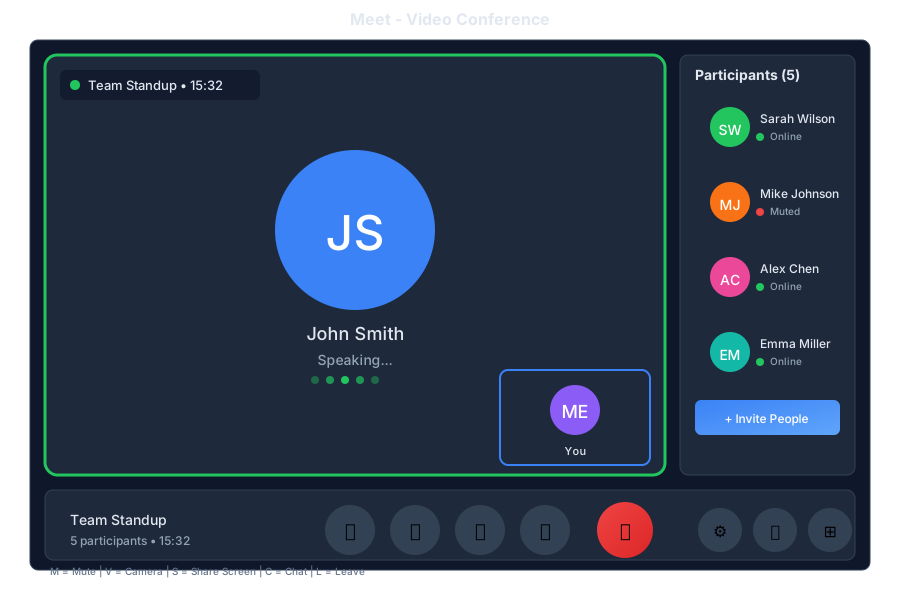
Your virtual meeting room
Meet is the video conferencing app in General Bots Suite. Host video calls, share your screen, collaborate in real-time, and let the AI take notes for you. Meet integrates seamlessly with Calendar so joining meetings is just one click away.
Control Description
🎤 Mute Toggle microphone 📹 Video Toggle camera 🖥️ Share Share screen ✋ Raise Hand Get attention 💬 Chat In-meeting chat 👥 Participants View attendees ⚙️ Settings Audio/video settings 📞 Leave End call
Feature Description
Screen Sharing Share your entire screen or specific window Recording Record meetings for later review Chat Send messages during the meeting Reactions Quick emoji reactions Raise Hand Queue to speak Breakout Rooms Split into smaller groups AI Notes Automatic meeting notes Transcription Live captions
Layout Best For
Gallery Group discussions Speaker Presentations Sidebar Screen sharing Spotlight Featured speaker
Shortcut Action
MToggle mute VToggle video SShare screen HRaise/lower hand CToggle chat PToggle participants RStart/stop recording SpacePush to talk (when muted) EscapeExit fullscreen
🎥 Meeting room ready!
📍 Room: Team Huddle
🔗 Link: https://meet.gb/abc-123
Click to join or share the link with others.
[🚀 Join Now]
10:00
Invite Sarah and John to the meeting
10:01
✅ Invitations sent!
📧 Sarah - invited
📧 John - invited
They'll receive a link to join.
10:01
Schedule a video call with the team for tomorrow at 3pm
14:30
✅ Meeting scheduled!
🎥 Team Video Call
📅 Tomorrow at 3:00 PM
👥 Invitations sent to team members
🔗 Link: https://meet.gb/xyz-789
Added to your calendar with reminder.
14:30
What were the key points from today's meeting?
16:00
📝 Meeting Summary - Team Sync
Duration: 45 minutes
Participants: 5
---
📌 Key Points:
• Project deadline moved to next Friday
• Budget approved for new tools
• Sarah will lead the client presentation
---
✅ Action Items:
• John: Update project timeline
• You: Review proposal by Wednesday
16:00
Show me the recording from yesterday's meeting
09:00
🎬 Meeting Recording
📅 Yesterday - Project Review
⏱️ Duration: 1:15:32
📁 Saved to: My Drive/Recordings
[▶️ Play] [⬇️ Download] [🔗 Share]
09:00
Endpoint Method Description
/api/meet/roomsGET List meeting rooms /api/meet/roomsPOST Create room /api/meet/rooms/:idGET Get room details /api/meet/rooms/:id/joinPOST Join meeting /api/meet/rooms/:id/leavePOST Leave meeting /api/meet/rooms/:id/invitePOST Invite participants /api/meet/recordingsGET List recordings /api/meet/recordings/:idGET Get recording
{
    "name": "Team Sync",
    "scheduled": "2025-05-16T15:00:00Z",
    "duration": 60,
    "participants": ["sarah@company.com", "john@company.com"],
    "settings": {
        "recording": true,
        "transcription": true,
        "waitingRoom": false
    }
}
{
    "id": "room-abc123",
    "name": "Team Sync",
    "url": "https://meet.gb/abc-123",
    "host": "you@company.com",
    "scheduled": "2025-05-16T15:00:00Z",
    "status": "scheduled",
    "participants": [
        {
            "email": "sarah@company.com",
            "status": "invited"
        }
    ],
    "settings": {
        "recording": true,
        "transcription": true
    }
}
Configure Meet in config.csv:
key,value
meet-provider,livekit
meet-server-url,wss://localhost:7880
meet-recording-enabled,true
meet-transcription-enabled,true
meet-max-participants,50
Chrome 90+
Firefox 88+
Safari 14+
Edge 90+
Webcam (optional)
Microphone
Speakers or headphones
Stable internet connection
Allow browser access to:
Camera
Microphone
Screen sharing (when needed)
Check browser permissions
Verify correct device selected in settings
Try refreshing the page
Check if another app is using the camera
Check internet connection speed
Close other bandwidth-heavy applications
Try disabling HD video
Move closer to your router
Verify the meeting link is correct
Check if meeting has started
Ensure you’re not blocked by waiting room
Try a different browser
Verify recording is enabled for the room
Check storage quota
Ensure you have host permissions