Integrated viewing for documents, audio, video, and presentations
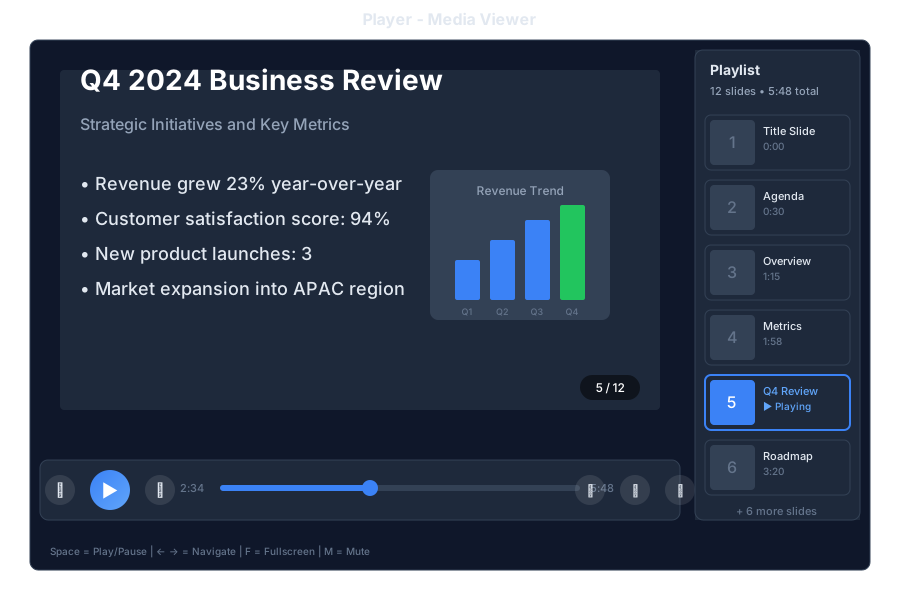
Player enables users to view and interact with various file types without leaving the conversation:
- Documents: PDF, DOCX, TXT, MD
- Presentations: PPTX, ODP
- Audio: MP3, WAV, OGG, M4A
- Video: MP4, WEBM, OGV
- Images: PNG, JPG, GIF, SVG, WEBP
When a bot shares a file, click the preview to open in Player:
📎 quarterly-report.pptx
Here's the quarterly report. Click to view.
10:30
📊 Opening presentation viewer...
Use ← → to navigate slides
10:30
Navigate to Drive tab and click any supported file to open in Player.
Access files directly:
/player/{bot_id}/{file_path}
| Control | Action |
|---|
| Previous / Next | Navigate pages |
| Zoom in / out | Adjust view size |
| Download | Download original |
| Search | Search in document |
| Thumbnails | Page thumbnails |
| Control | Action |
|---|
| Play / Pause | Control playback |
| Rewind / Forward | Skip 10 seconds |
| Volume | Volume slider |
| Loop | Loop toggle |
| Download | Download file |
| Control | Action |
|---|
| Play / Pause | Control playback |
| Skip | Skip backward / forward |
| Volume | Volume control |
| Fullscreen | Enter fullscreen |
| Speed | Playback speed |
| Picture-in-picture | Floating window |
| Download | Download file |
| Control | Action |
|---|
| Previous / Next | Navigate slides |
| Fullscreen | Presentation mode |
| Overview | Slide overview |
| Notes | Speaker notes (if available) |
| Download | Download original |
| Key | Action |
|---|
Space | Play/Pause (audio/video) or Next (slides) |
← / → | Previous / Next |
↑ / ↓ | Volume up / down |
F | Fullscreen toggle |
M | Mute toggle |
Esc | Exit fullscreen / Close player |
+ / - | Zoom in / out |
Home / End | Go to start / end |
🎬 training/welcome-video.mp4
Watch this 2-minute introduction video.
14:20
📊 reports/q4-results.pptx
Here are the quarterly results. Use arrow keys to navigate.
14:21
🎵 audio/podcast-episode-42.mp3
Listen to the latest episode.
14:22
| Format | Extension | Notes |
|---|
| PDF | .pdf | Full support with text search |
| Word | .docx | Converted to viewable format |
| Text | .txt | Plain text with syntax highlighting |
| Markdown | .md | Rendered with formatting |
| HTML | .html | Sanitized rendering |
| Format | Extension | Notes |
|---|
| PowerPoint | .pptx | Full slide support |
| OpenDocument | .odp | Converted to slides |
| PDF | .pdf | Treated as slides |
| Format | Extension | Notes |
|---|
| MP3 | .mp3 | Universal support |
| WAV | .wav | Uncompressed audio |
| OGG | .ogg | Open format |
| M4A | .m4a | AAC audio |
| FLAC | .flac | Lossless audio |
| Format | Extension | Notes |
|---|
| MP4 | .mp4 | H.264/H.265 |
| WebM | .webm | VP8/VP9 |
| OGV | .ogv | Theora |
| Format | Extension | Notes |
|---|
| PNG | .png | Lossless with transparency |
| JPEG | .jpg, .jpeg | Compressed photos |
| GIF | .gif | Animated support |
| SVG | .svg | Vector graphics |
| WebP | .webp | Modern format |
Configure Player behavior in config.csv:
key,value
player-autoplay,false
player-default-volume,80
player-video-quality,auto
player-preload,metadata
player-allow-download,true
player-max-file-size-mb,100
GET /api/drive/{bot_id}/files/{file_path}?preview=true
GET /api/drive/{bot_id}/stream/{file_path}
Supports HTTP Range requests for seeking.
GET /api/drive/{bot_id}/thumbnail/{file_path}
- Files are served through authenticated endpoints
- User permissions respected for file access
- Downloads can be disabled per bot
- Watermarking available for sensitive documents
- Lazy loading for large documents
- Adaptive streaming for video
- Thumbnail generation for previews
- Client-side caching for repeat views
Player is fully responsive:
- Touch gestures for navigation
- Pinch-to-zoom for documents
- Swipe for slides
- Native fullscreen support