Your personal scheduling assistant
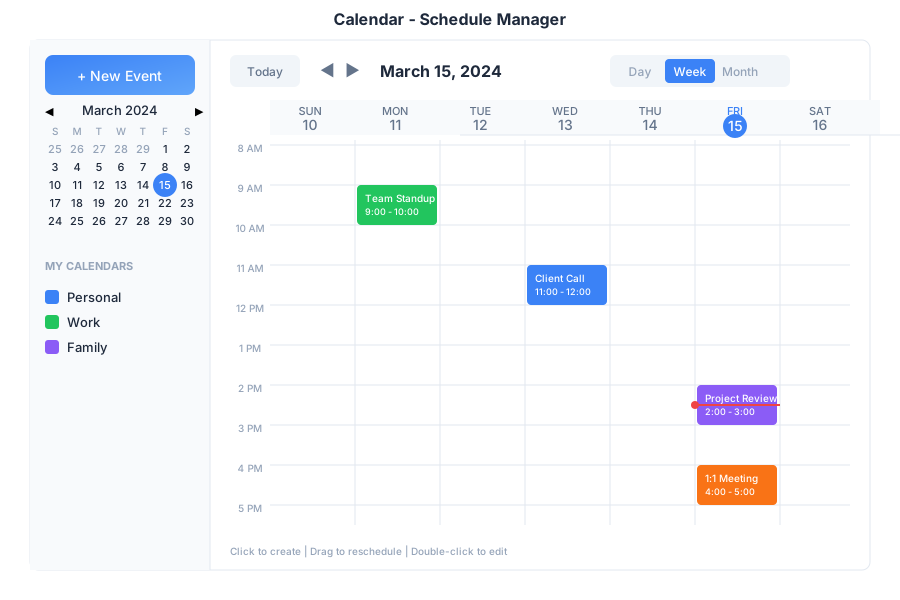
Calendar is your scheduling hub in General Bots Suite. Create events, manage appointments, schedule meetings, and let the AI help you find the perfect time. Calendar syncs with your other apps so you never miss an important date.
View Description
Day Hourly breakdown of single day Week 7-day overview Month Full month grid Agenda List of upcoming events
Calendar Icon Use For
Personal 🟢 Private appointments Work 🔵 Professional meetings Team 🟣 Shared team events Holidays 🔴 Public holidays
Type Icon Description
Meeting 👥 Group meetings Call 📞 Phone/video calls Reminder 🔔 Personal reminders All-Day 📅 Full day events Recurring 🔄 Repeating events
Shortcut Action
CCreate new event TGo to today DDay view WWeek view MMonth view ← / →Previous / Next period DeleteDelete selected event EnterOpen event details
Schedule a meeting with Sarah tomorrow at 2pm
10:30
✅ Meeting scheduled!
👥 Meeting with Sarah
📅 Tomorrow at 2:00 PM
⏱️ Duration: 1 hour
Invitation sent to Sarah.
10:30
What's on my calendar today?
08:00
📅 Today's Schedule (May 15):
09:00 AM - Team Standup (30 min)
11:00 AM - Client Call (1 hour)
02:00 PM - Project Review (1 hour)
04:30 PM - 1:1 with Manager (30 min)
You have 4 events today.
08:00
When am I free this week for a 2-hour meeting?
09:15
🗓️ Available 2-hour slots this week:
• Tuesday 3:00 PM - 5:00 PM
• Wednesday 10:00 AM - 12:00 PM
• Thursday 2:00 PM - 4:00 PM
• Friday 9:00 AM - 11:00 AM
Would you like to book one of these?
09:15
Move my 2pm meeting to 4pm
13:30
✅ Meeting rescheduled!
👥 Project Review
📅 Today at 4:00 PM (was 2:00 PM)
Updated invitations sent to attendees.
13:30
Remind me about the dentist appointment on Friday at 9am
11:00
✅ Reminder set!
🔔 Dentist appointment
📅 Friday at 9:00 AM
⏰ I'll remind you 1 hour before.
11:00
Endpoint Method Description
/api/calendar/eventsGET List events /api/calendar/eventsPOST Create event /api/calendar/events/:idGET Get event details /api/calendar/events/:idPATCH Update event /api/calendar/events/:idDELETE Delete event /api/calendar/availabilityGET Check free/busy
Parameter Values Default
startISO date Today endISO date +30 days calendarCalendar name All viewday, week, monthmonth
{
    "title": "Team Meeting",
    "start": "2025-05-16T14:00:00Z",
    "end": "2025-05-16T15:00:00Z",
    "calendar": "work",
    "attendees": ["sarah@company.com"],
    "location": "Conference Room A",
    "reminder": 15,
    "recurrence": null
}
{
    "id": "evt-123",
    "title": "Team Meeting",
    "start": "2025-05-16T14:00:00Z",
    "end": "2025-05-16T15:00:00Z",
    "calendar": "work",
    "attendees": [
        {
            "email": "sarah@company.com",
            "status": "accepted"
        }
    ],
    "location": "Conference Room A",
    "reminder": 15,
    "created": "2025-05-15T10:30:00Z"
}
Tasks with due dates automatically appear on your calendar. When you complete a task, it’s marked as done on the calendar too.
Refresh the calendar
Check internet connection
Verify calendar is enabled in sidebar
Wait a few minutes for sync
Verify you have write access to the calendar
Check that start time is before end time
Ensure date is not in the past
Check spam/junk folder in email
Verify attendee email addresses
Check notification settings