Your intelligent inbox
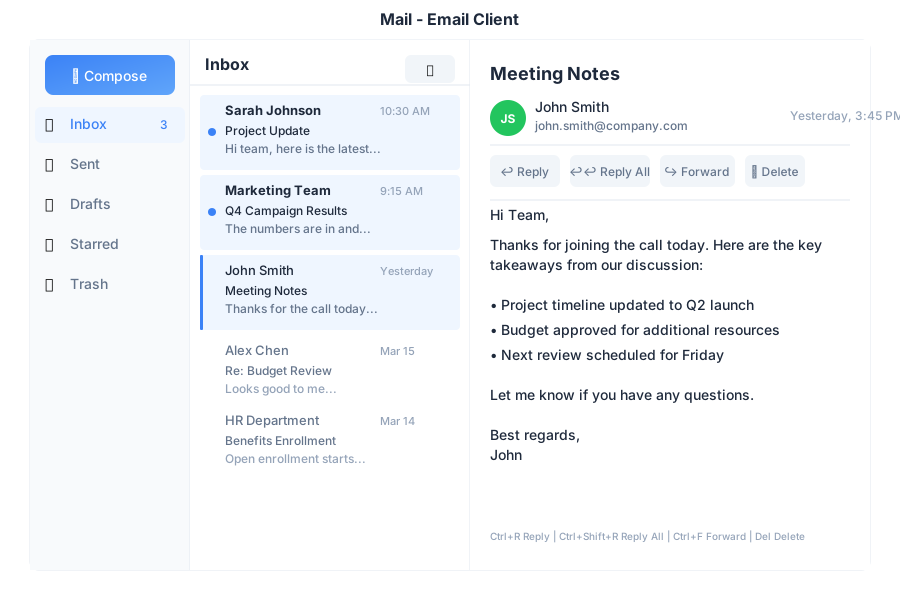
Mail is the email application in General Bots Suite. Read, compose, and organize your emails with AI assistance. Mail helps you write better emails, find important messages, and stay on top of your inbox without the clutter.
Folder Description
📥 Inbox Incoming messages ⭐ Starred Important emails 📤 Sent Sent messages 📝 Drafts Unsent drafts 🗑️ Trash Deleted emails
Label Icon Use For
Urgent 🔴 Time-sensitive Personal 🟢 Private emails Work 🔵 Professional Finance 🟡 Bills & money Custom 🟣 Create your own
Action Description
Reply Respond to sender Reply All Respond to all recipients Forward Send to someone else Archive Remove from inbox Star Mark as important Label Organize with labels Delete Move to trash
Shortcut Action
CCompose new email RReply AReply all FForward EArchive SStar/unstar DeleteMove to trash Ctrl+EnterSend email EscapeClose/cancel ↑ / ↓Navigate emails
📥 You have 5 unread emails:
⭐ Sarah Johnson - Q2 Report Review
📧 Mike Chen - Meeting Tomorrow
📧 LinkedIn - 5 new connections
📧 Newsletter - Weekly Tech Digest
📧 HR Team - Policy Update
09:00
Read the email from Sarah
09:01
📧 Q2 Report Review
From: Sarah Johnson
Date: Today at 10:32 AM
---
Hi,
Please review the attached Q2 report and let me know if you have any questions. I've highlighted the key metrics on page 3.
📎 Q2-Report.pdf (2.4 MB)
---
[Reply] [Forward] [Archive]
09:01
Write an email to John about the project deadline
10:30
📝 Here's a draft:
To: john@company.com
Subject: Project Deadline Update
---
Hi John,
I wanted to touch base regarding the project deadline. Could we schedule a quick call to discuss the timeline and any potential adjustments needed?
Let me know your availability.
Best regards
---
[📤 Send] [✏️ Edit] [🗑️ Discard]
10:30
✅ Email sent to John!
📤 Subject: Project Deadline Update
10:31
Write a polite email declining the meeting invitation for tomorrow
14:20
📝 Here's a polite decline:
Subject: Re: Meeting Tomorrow
---
Hi Mike,
Thank you for the invitation. Unfortunately, I have a scheduling conflict and won't be able to attend tomorrow's meeting.
Would it be possible to reschedule, or could someone share the meeting notes with me afterward?
Thanks for understanding.
Best regards
---
[📤 Send] [✏️ Edit] [🗑️ Discard]
14:20
Find emails about the budget from last month
11:00
🔍 Found 3 emails about "budget" from last month:
📧 Finance Team - Q1 Budget Review (Apr 15)
📧 Sarah - Budget Approval Needed (Apr 10)
📧 John - Budget Questions (Apr 5)
Which one would you like to read?
11:00
Endpoint Method Description
/api/email/inboxGET List inbox messages /api/email/sendPOST Send email /api/email/draftPOST Save draft /api/email/:idGET Read email /api/email/:idDELETE Delete email /api/email/:id/starPOST Toggle star /api/email/:id/labelPOST Add label /api/email/searchGET Search emails
Parameter Values Default
folderinbox, sent, drafts, trash, starredinboxlabelLabel name none unreadtrue, falsenone limit1-100 25 offsetNumber 0
{
    "to": ["john@company.com"],
    "cc": [],
    "bcc": [],
    "subject": "Project Update",
    "body": "Hi John,\n\nHere's the latest update...",
    "attachments": ["file-id-123"]
}
{
    "id": "msg-456",
    "from": "sarah@company.com",
    "to": ["you@company.com"],
    "subject": "Q2 Report Review",
    "body": "Hi,\n\nPlease review the attached...",
    "date": "2025-05-15T10:32:00Z",
    "read": false,
    "starred": true,
    "labels": ["work"],
    "attachments": [
        {
            "id": "att-789",
            "name": "Q2-Report.pdf",
            "size": 2457600
        }
    ]
}
Configure email in config.csv:
key,value
smtp-server,smtp.gmail.com
smtp-port,587
imap-server,imap.gmail.com
imap-port,993
email-from,Your Name <you@gmail.com>
Note: Use app-specific passwords for Gmail, not your main password.
Check internet connection
Verify email credentials
Check IMAP settings
Refresh the page
Check recipient address
Verify SMTP settings
Check attachment size (max 25MB)
Try again in a moment
Check spam/junk folder
Verify filters aren’t hiding emails
Check trash folder
Sync may take a few minutes