Autonomous Tasks
Build complete applications through natural conversation. Describe what you want, and the system creates it automatically.
The AutoTask system uses an LLM-powered intent classifier to understand your request and route it to the appropriate handler. Whether you need a full web application, a simple reminder, or automated monitoring, you describe it in plain language.
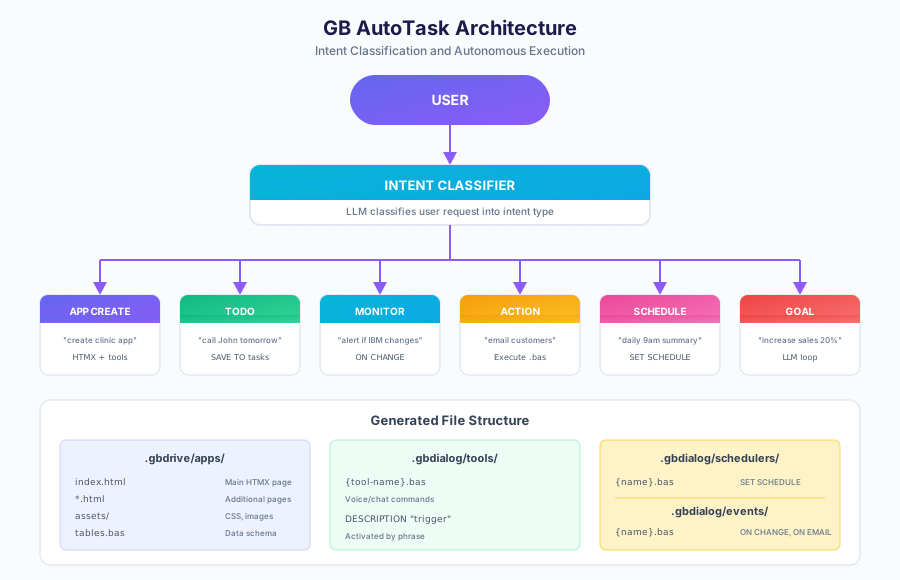
Intent Types
| Type | Example | What Gets Created |
|---|---|---|
APP_CREATE | “create app for clinic” | HTMX pages, tools, schedulers |
TODO | “call John tomorrow” | Task saved to tasks table |
MONITOR | “alert when IBM changes” | ON CHANGE event handler |
ACTION | “email all customers” | Executes immediately |
SCHEDULE | “daily 9am summary” | SET SCHEDULE automation |
GOAL | “increase sales 20%” | Autonomous LLM loop with metrics |
TOOL | “when I say X, do Y” | Voice/chat command |
Quick Start
Architecture Overview
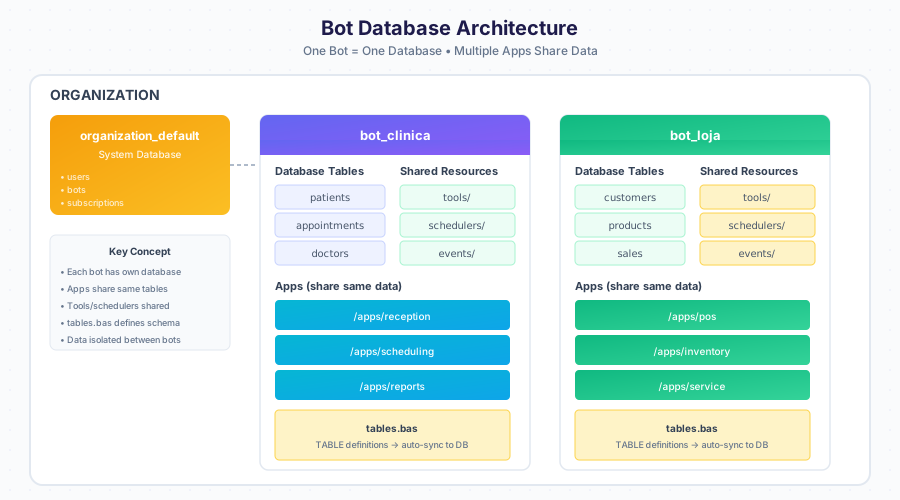
One bot equals one database. All applications within a bot share the same data tables, tools, and schedulers.
File Structure
| Path | Description |
|---|---|
.gbdrive/apps/{name}/ | Generated web application |
.gbdrive/apps/{name}/index.html | Main HTMX page |
.gbdrive/apps/{name}/assets/ | CSS, images |
.gbdialog/tables.bas | Database schema definitions |
.gbdialog/tools/ | Voice and chat commands |
.gbdialog/schedulers/ | Timed automations |
.gbdialog/events/ | Event triggers (ON CHANGE, ON EMAIL) |
Creating an Application
Modifying Your Application
Use Designer to change anything about your app through conversation.
Adding Automation
Keywords Reference
| Keyword | Purpose |
|---|---|
TABLE | Define data structure |
FIND | Search records |
SAVE | Create record |
UPDATE | Modify record |
DELETE | Remove record |
TALK | Send message |
HEAR | Wait for input |
SET SCHEDULE | Create automation |
ON CHANGE | Monitor for changes |
ON EMAIL | Trigger on email received |
Next Steps
- Designer Guide — Edit apps through conversation
- Data Model — Understanding tables
- Task Workflow — How tasks execute
- Examples — Real-world applications