Designer
Designer is an AI assistant that appears alongside your application. Use natural conversation to modify any aspect of your app without writing code.
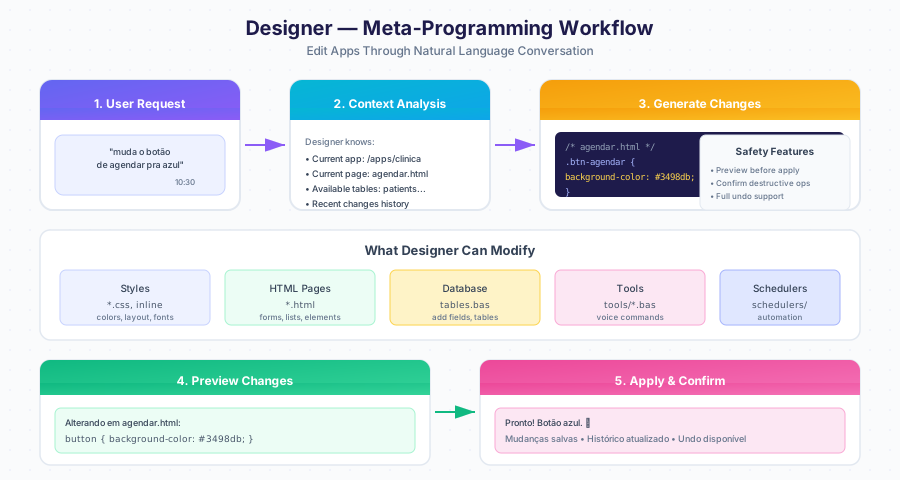
How It Works
Designer understands the context of your application. When you make a request, it knows which app you are viewing, which page is active, and what tables exist.
What Designer Can Modify
| Category | Examples |
|---|---|
| Styles | Colors, layout, fonts, spacing |
| HTML Pages | Forms, lists, buttons, elements |
| Database | Add fields, create tables |
| Tools | Voice commands, chat triggers |
| Schedulers | Automated tasks, reports |
Editing Styles
Adding Form Fields
Creating Voice Commands
Creating Schedulers
Adding Database Fields
Context Awareness
Designer tracks your current location and correlates follow-up requests.
| Context | How It Is Used |
|---|---|
| Current app | Edits apply to that app’s files |
| Current page | Defaults edits to that file |
| Recent changes | Correlates follow-up requests |
| Available tables | Knows your data structure |
| Existing tools | Knows voice commands already created |
Handling Sensitive Information
When Designer needs API keys or credentials:
Preview Before Changes
Designer shows what will change before applying destructive operations.
Safety Features
| Feature | Description |
|---|---|
| Preview changes | Shows what will change before applying |
| Confirm destructive actions | Asks before deleting |
| Change history | All changes are logged |
| Undo support | Can undo recent changes |
Limitations
| Limitation | Reason |
|---|---|
| Cannot delete entire app | Safety protection |
| Cannot access external systems without credentials | Security |
| Cannot modify system files | Isolation |
| Cannot execute arbitrary code | Security |
Available Keywords
Designer uses GB BASIC keywords to implement changes:
| Category | Keywords |
|---|---|
| Communication | TALK, HEAR, SEND MAIL, SEND TEMPLATE |
| Data | FIND, SAVE, UPDATE, DELETE |
| Automation | SET SCHEDULE, ON CHANGE, ON EMAIL |
| AI | LLM, USE KB |
| Web | SCRAPE, GET, POST, RSS |
| Memory | SET BOT MEMORY, GET BOT MEMORY |
| Control | IF/THEN/ELSE, FOR EACH/NEXT, WHILE/WEND |
Undoing Changes
Tips for Better Results
Be Specific
| Less Effective | More Effective |
|---|---|
| “improve the form” | “add email validation to the form” |
| “change the colors” | “change the main button to green” |
| “fix this” | “increase the font size in the table” |
Combine Requests
Next Steps
- App Generation — How apps are created
- Task Workflow — How tasks are processed
- Data Model — TABLE keyword reference