Vibe — AI Development Environment
Chat-driven coding, deployment, and infrastructure management
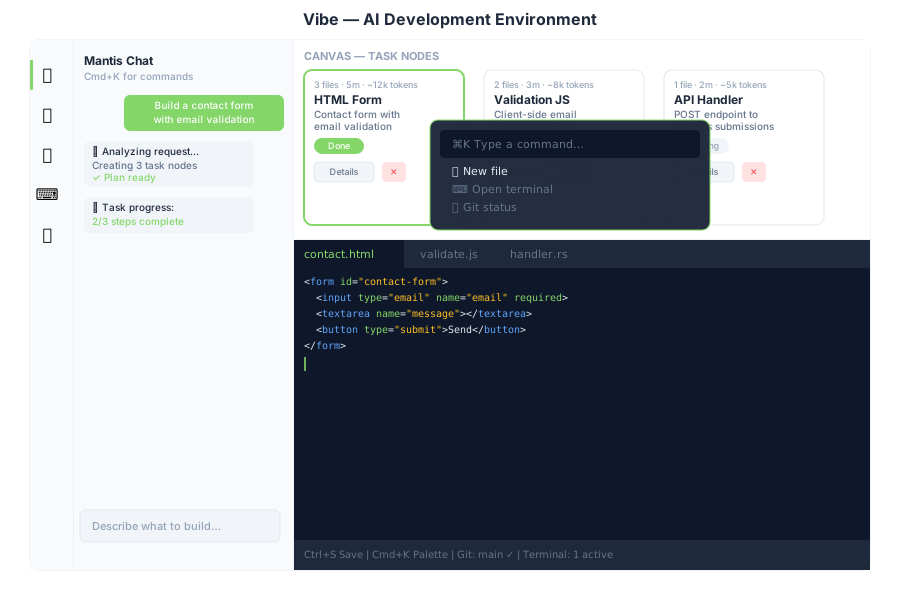
Overview
Vibe is the integrated development environment inside General Bots Suite. Describe what you want to build in plain language and Mantis AI agents generate task nodes, write code, run commands, and deploy — all from a single interface.
Features
Chat-Driven Development
Type a request in the chat panel. Mantis #1 classifies the intent via POST /api/autotask/classify, generates a plan, and creates task nodes on the canvas.
Canvas (Task Nodes)
Each task is represented as a node on the horizontal canvas showing:
- File count, estimated time, token usage
- Status (Planning → In Progress → Done)
- Sub-tasks (expandable file list)
- Details button — fetches full task info from
GET /api/autotask/tasks/:id - Delete button — removes node from canvas
Canvas state is persisted in localStorage (vibe-canvas-nodes) and restored on page load.
Command Palette
Press Cmd+K (or Ctrl+K) to open the command palette:
| Command | Action |
|---|---|
| New file | Opens editor panel |
| Open terminal | Opens terminal panel |
| Git status | Opens git panel |
| Database schema | Opens database panel |
| Clear canvas | Removes all task nodes |
| Deploy | Triggers deployment |
Press Escape to close.
Monaco Editor
Full code editor with:
- File tree sidebar →
GET /api/editor/files - Click to open files →
GET /api/editor/file/*path Ctrl+Sto save →POST /api/editor/file/*path- Syntax highlighting for Rust, JS, HTML, CSS, TOML
Terminal
Embedded xterm.js terminal connected via WebSocket → /api/terminal/ws.
Create, list, and kill terminal sessions via POST /api/terminal/create, GET /api/terminal/list, POST /api/terminal/kill.
Database Tool
- ER diagram of all tables
- Table viewer with pagination →
GET /api/database/table/:name/data - SQL query builder →
POST /api/database/query - Row insert/update/delete →
POST /api/database/table/:name/row
Git Integration
- Status and diff viewer →
GET /api/git/status,GET /api/git/diff/:file - Commit →
POST /api/git/commit - Push →
POST /api/git/push - Branch management →
GET /api/git/branches,POST /api/git/branch/:name - Log →
GET /api/git/log
Deployment
Click Deploy to trigger POST /api/bots/:id/deploy. Real-time progress streams via the task progress WebSocket, shown in the chat panel.
Enabling Vibe
Vibe is always available in the suite — no feature gate required. Access it from the desktop icon or via http://localhost:3000/suite/vibe.