Research - AI Search
Your intelligent research assistant
Overview
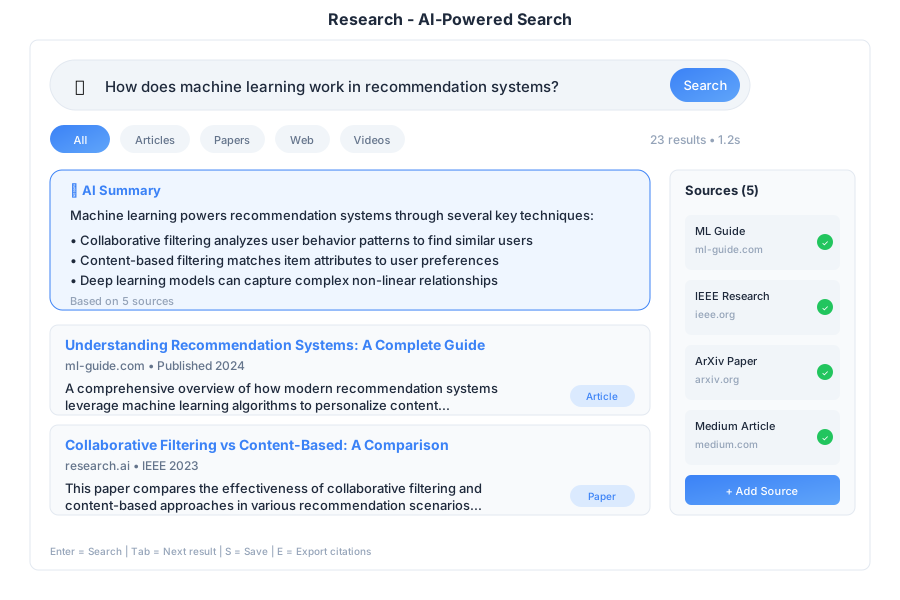
Research is the AI-powered search and discovery app in General Bots Suite. Find information from the web, your documents, and databases using natural language. Research understands your questions, finds relevant sources, and presents organized answers with citations.
Features
Basic Search
Just type your question in natural language:
Example Questions:
| Category | Examples |
|---|---|
| 📊 Business | “What are our sales numbers for Q1 2025?” |
| 📚 Knowledge | “How does photosynthesis work?” |
| 🔍 Research | “Compare React vs Vue for web development” |
| 📋 Documents | “What does our employee handbook say about PTO?” |
Search Sources
Choose where to search:
| Source | What It Searches | Best For |
|---|---|---|
| All | Everything available | General questions |
| Web | Internet/public websites | Current events, general knowledge |
| Documents | Your uploaded files (.gbkb) | Company policies, internal info |
| Database | Connected databases | Business data, reports |
| Custom | Specific sources you choose | Focused research |
AI-Powered Answers
Research doesn’t just find links—it reads, understands, and summarizes:
Follow-Up Questions
Continue your research with follow-up questions:
Source Citations
Every answer includes citations so you can verify:
| Source Type | Information Provided |
|---|---|
| Internal Documents | File name, location, relevant pages |
| Web Sources | URL, retrieval date, site name |
| Database | Table name, query used |
Actions available:
- View Document - Open the source file
- Open Link - Navigate to web source
- Copy Citation - Copy formatted citation
Research History
Access your previous searches:
- Click History in the top right
- Browse or search past queries
- Click to revisit any search
History is organized by:
- Today - Recent searches
- Yesterday - Previous day
- Last Week - Older searches
Export Results
Save your research for later use:
| Format | Best For |
|---|---|
| Sharing, printing | |
| Markdown | Documentation |
| Word | Reports, editing |
| Copy to Paper | Continue writing |
Export Options:
- Include answer
- Include sources with citations
- Include search query
- Include timestamp
Advanced Search
Use operators for more precise searches:
| Operator | Example | What It Does |
|---|---|---|
"" | "exact phrase" | Find exact match |
AND | solar AND wind | Both terms required |
OR | solar OR wind | Either term |
NOT | energy NOT nuclear | Exclude term |
site: | site:company.com | Search specific site |
type: | type:pdf | Search specific file type |
date: | date:2025 | Filter by date |
in: | in:documents | Search specific source |
Examples:
"quarterly report" AND sales date:2025 - Finds documents with exact phrase “quarterly report” AND the word “sales” from 2025
project proposal NOT draft type:pdf - Finds PDF files about project proposals, excluding drafts
Keyboard Shortcuts
| Shortcut | Action |
|---|---|
/ | Focus search box |
Enter | Search |
Ctrl+Enter | Search in new tab |
Escape | Clear search / close panel |
↑ / ↓ | Navigate results |
Ctrl+C | Copy answer |
Ctrl+S | Save/export results |
H | Open history |
Tab | Cycle through sources |
1-5 | Jump to source N |
Tips & Tricks
Better Search Results
💡 Be specific - “Q1 2025 sales revenue by region” works better than “sales”
💡 Use natural language - Ask questions like you would ask a colleague
💡 Try different phrasings - If results aren’t great, rephrase your question
💡 Use follow-ups - Build on previous searches for deeper research
Finding Documents
💡 Mention the document type - “Find the PDF about vacation policy”
💡 Reference dates - “Meeting notes from last Tuesday”
💡 Name departments - “HR policies about sick leave”
Web Research
💡 Be current - Add “2025” or “latest” for recent information
💡 Compare sources - Research shows multiple sources for verification
💡 Check citations - Click through to verify important information
Troubleshooting
No results found
Possible causes:
- Query too specific
- Information not in knowledge base
- Typo in search terms
Solution:
- Try broader search terms
- Search “All” sources instead of one
- Check spelling
- Try different phrasing
- Upload relevant documents to knowledge base
Wrong or irrelevant results
Possible causes:
- Ambiguous query
- Outdated documents in KB
- Source selection too broad
Solution:
- Be more specific in your question
- Use quotes for exact phrases
- Select specific source (Documents only, Web only)
- Use advanced operators
Sources not loading
Possible causes:
- Document was moved or deleted
- Web page no longer available
- Permission issues
Solution:
- Check if document exists in Drive
- Try opening the web link directly
- Ask administrator about permissions
- Use cached/saved version if available
Search is slow
Possible causes:
- Searching many sources
- Large knowledge base
- Complex query
Solution:
- Select specific source instead of “All”
- Be more specific to narrow results
- Wait for indexing to complete (if recent uploads)
- Check network connection
AI answer seems incorrect
Possible causes:
- Outdated information in sources
- AI misinterpreted question
- Conflicting information in sources
Solution:
- Always verify with cited sources
- Rephrase your question
- Ask for clarification: “Are you sure about X?”
- Check multiple sources for accuracy
BASIC Integration
Use Research in your bot dialogs:
Basic Search
HEAR question AS TEXT "What would you like to know?"

result = SEARCH question

TALK result.answer

TALK "Sources:"
FOR EACH source IN result.sources
    TALK "- " + source.title
NEXT
Search Specific Sources
' Search only documents
result = SEARCH "vacation policy" IN "documents"

' Search only web
result = SEARCH "latest AI news" IN "web"

' Search specific knowledge base
result = SEARCH "product specs" IN "products.gbkb"
Research with Follow-up
TALK "What would you like to research?"
HEAR topic AS TEXT

result = SEARCH topic
TALK result.answer

HEAR followUp AS TEXT "Any follow-up questions? (or 'done')"

WHILE followUp <> "done"
    result = SEARCH followUp WITH CONTEXT result
    TALK result.answer
    HEAR followUp AS TEXT "Any more questions? (or 'done')"
WEND

TALK "Research complete!"
Export Research
HEAR query AS TEXT "What should I research?"

result = SEARCH query

' Export as PDF
pdf = EXPORT RESEARCH result AS "PDF"
SEND FILE pdf

' Or copy to Paper
doc = CREATE DOCUMENT "Research: " + query
doc.content = result.answer + "\n\nSources:\n" + result.citations
SAVE DOCUMENT doc

TALK "Research saved to Paper"
Automated Research Report
topics = ["market trends", "competitor analysis", "customer feedback"]

report = ""
FOR EACH topic IN topics
    result = SEARCH topic + " 2025"
    report = report + "## " + topic + "\n\n"
    report = report + result.answer + "\n\n"
NEXT

doc = CREATE DOCUMENT "Weekly Research Report"
doc.content = report
SAVE DOCUMENT doc

TALK "Research report created with " + COUNT(topics) + " topics"
See Also
- Paper App - Write documents based on your research
- Drive App - Upload documents to knowledge base
- Chat App - Ask quick questions
- How To: Add Documents to Knowledge Base