Quick Start
Installation in 3 Steps
1. Run botserver
./botserver
That’s it! No configuration needed.
2. Wait for Bootstrap (2-5 minutes)
You’ll see:
botserver starting...
Bootstrap: Detecting system...
Installing PostgreSQL...
   Database created
   Schema initialized
Installing Drive...
   Object storage ready
   Buckets created
Installing Cache...
   Cache server running
Creating bots from templates...
   default.gbai deployed
   announcements.gbai deployed
botserver ready at http://localhost:8080
3. Open Browser
http://localhost:8080
Start chatting with your bot!
What Just Happened?
Bootstrap Flow
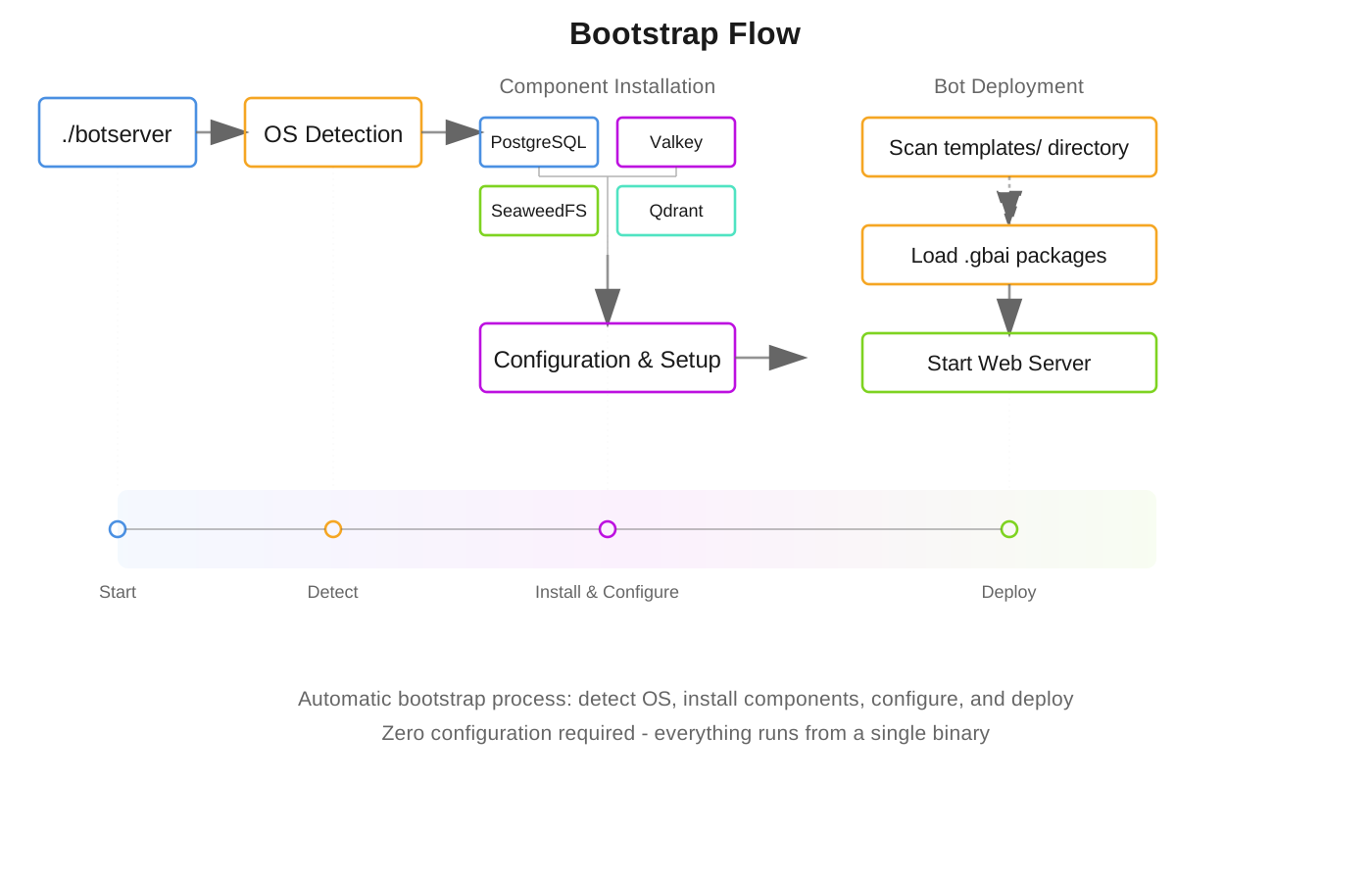
The automatic bootstrap process:
- Detected your OS (Linux/macOS/Windows)
- Downloaded PostgreSQL database to botserver-stack/
- Downloaded drive (S3-compatible storage) to botserver-stack/
- Downloaded cache component to botserver-stack/
- Generated secure credentials
- Created database schema
- Deployed default bots to object storage
- Started UI server on port 8080
Zero manual configuration required!
Using Existing Services
If you already have PostgreSQL or drive storage running, configure them in config.csv of your bot:
name,value
database-url,postgres://myuser:mypass@myhost:5432/mydb
drive-server,http://my-drive:9000
drive-accesskey,my-access-key
drive-secret,my-secret-key
Step 2: Write a Simple Tool
How Tools Work

Tools are just .bas files. Create enrollment.bas:
' Student enrollment tool
PARAM name, email, course
DESCRIPTION "Processes student enrollment"

SAVE "enrollments.csv", name, email, course, NOW()
TALK "Welcome to " + course + ", " + name + "!"
The LLM automatically discovers this tool and knows when to call it!
Step 3: Add Knowledge Base
Drop documents in a .gbkb/ folder:
mybot.gbai/
  mybot.gbkb/
    docs/
      manual.pdf
      faq.docx
      guide.txt
The bot automatically:
- Indexes documents with vector embeddings
- Answers questions from the content
- Updates when files change
Container Deployment (LXC)
For production isolation, botserver supports LXC (Linux Containers):
# Create container
lxc-create -n botserver -t download -- -d ubuntu -r jammy -a amd64

# Start and attach
lxc-start -n botserver
lxc-attach -n botserver

# Install botserver inside container
./botserver
Benefits:
- Process isolation
- Resource control
- Easy management
- Lightweight virtualization
Optional Components
After installation, add more features:
./botserver install email      # Email server
./botserver install directory  # Identity provider
./botserver install llm        # Local LLM server (offline mode)
./botserver install meeting    # Video conferencing
Example Bot Structure
mybot.gbai/
  mybot.gbdialog/          # Dialog scripts
    start.bas            # Entry point (required)
    get-weather.bas      # Tool (auto-discovered)
    send-email.bas       # Tool (auto-discovered)
  mybot.gbkb/              # Knowledge base
    docs/                # Document collection
    faq/                 # FAQ collection
  mybot.gbot/              # Configuration
    config.csv           # Bot parameters
  mybot.gbtheme/           # UI theme (optional)
    custom.css
Deploy new bots by uploading to object storage (creates a new bucket), not the local filesystem. The work/ folder is for internal use only.
Local Development with Auto-Sync
Edit bot files locally and sync automatically to drive storage:
Free S3 Sync Tools:
- Cyberduck - GUI file browser (Windows/Mac/Linux)
- rclone - Command-line sync (All platforms)
- WinSCP - File manager with S3 (Windows)
- S3 Browser - Freeware S3 client (Windows)
Quick Setup with rclone:
# Configure for drive storage
rclone config  # Follow prompts for S3-compatible storage

# Auto-sync local edits to bucket
rclone sync ./mybot.gbai drive:mybot --watch
Now when you:
- Edit
.csv→ Bot config reloads automatically - Edit
.bas→ Scripts compile automatically - Add docs to
.gbkb/→ Knowledge base updates
How It Really Works
You DON’T write complex dialog flows. Instead:
1. Add Documents
mybot.gbkb/
  policies/enrollment-policy.pdf
  catalog/courses.pdf
2. Create Tools (Optional)
' enrollment.bas - just define what it does
PARAM name AS string
PARAM course AS string
SAVE "enrollments.csv", name, course
3. Start Chatting!
User: I want to enroll in computer science
Bot: I'll help you enroll! What's your name?
User: John Smith
Bot: [Automatically calls enrollment.bas with collected params]
     Welcome to Computer Science, John Smith!
The LLM handles ALL conversation logic automatically!
Configuration (Optional)
Configure per-bot settings in config.csv:
name,value
server_port,8080
llm-url,http://localhost:8081
episodic-memory-threshold,4
theme-color1,#0d2b55
Troubleshooting
Port 8080 in use?
Edit templates/default.gbai/default.gbot/config.csv:
name,value
server_port,3000
Clean install?
# Remove everything and start fresh
rm -rf botserver-stack/
rm .env
./botserver  # Will regenerate everything
Check component status
./botserver status tables    # PostgreSQL
./botserver status drive     # Drive storage
./botserver status cache     # Cache component
Documentation
- Full Installation Guide - Detailed bootstrap explanation
- Tool Definition - Creating tools
- BASIC Keywords - Language reference
- Package System - Creating bots
- Architecture - How it works
The Magic Formula
Documents + Tools + LLM = Intelligent Bot
What You DON’T Need:
- IF/THEN logic
- Intent detection
- Dialog flow charts
- State machines
- Complex routing
What You DO:
- Drop documents in
.gbkb/ - Create simple
.bastools (optional) - Start chatting!
The LLM understands context, calls tools, searches documents, and maintains conversation naturally.
Philosophy
- Just Run It - No manual configuration
- Simple Scripts - BASIC-like language anyone can learn
- Automatic Discovery - Tools and KBs auto-detected
- Secure by Default - Credentials auto-generated
- Production Ready - Built for real-world use
Real Example: Education Bot
-
Add course materials:
edu.gbkb/ courses/computer-science.pdf policies/enrollment.pdf -
Create enrollment tool:
' enrollment.bas PARAM name AS string PARAM course AS string SAVE "enrollments.csv", name, course -
Just chat:
User: What courses do you offer?
Bot: [Searches PDFs] We offer Computer Science, Data Science...

User: I want to enroll
Bot: [Calls enrollment.bas] Let me help you enroll...
No programming logic needed - the LLM handles everything!